> ## Documentation Index
> Fetch the complete documentation index at: https://docs.getnao.io/llms.txt
> Use this file to discover all available pages before exploring further.
# Semantic Layer (dbt MetricFlow)
> Let the agent answer metric questions with your governed dbt definitions instead of hand-written SQL
If your dbt project declares [semantic models and metrics](https://docs.getdbt.com/docs/build/about-metricflow), nao can use them directly. Point `nao_config.yaml` at the `semantic_manifest.json` that `dbt parse` produces, and the agent gets a new tool, `execute_semantic_query`, that takes metrics and dimensions rather than SQL:
```json theme={null}
{
"metrics": ["revenue"],
"group_by": ["metric_time__month", "customer__region"],
"where": ["{{ Dimension('order__status') }} = 'completed'"],
"order_by": ["metric_time__month"]
}
```
nao compiles that request to SQL with MetricFlow, using the exact definitions your data team wrote, and runs it on the warehouse you already connected. `revenue` means what `metrics.yml` says it means, every time, in every chat.
MetricFlow runs **inside nao**, as a SQL compiler only. There is no call to
dbt Cloud, no Semantic Layer plan to buy, and MetricFlow never opens a
connection to your warehouse: the SQL it produces goes through the same
`execute_sql` pipeline as any other query, so read-only checks, row limits,
excluded columns and strict mode apply unchanged.
## Why a semantic layer?
An agent writing SQL from table documentation has to re-derive your business logic every time: which status counts as completed, whether revenue includes refunds, which join gives one row per customer. It gets that right most of the time. A semantic layer makes it right by construction, because the agent no longer writes the aggregation - it names it.
That changes three things in practice:
* **Consistency.** Two users asking for "revenue by month" in two chats get the same number, and the same number as your BI tool.
* **Governance.** Metric definitions stay in dbt, versioned and reviewed like the rest of your project. nao reads them; it does not redefine them.
* **Less context to write.** Every metric and dimension is documented for the agent by `nao sync`, from the manifest. You do not describe them again in `RULES.md`.
Raw SQL remains available for everything the layer does not cover - exploration, one-off joins, tables outside the semantic models - unless you decide otherwise (see [Modes](#choosing-how-the-agent-uses-it)).
## Setup
MetricFlow is an optional dependency of `nao-core`:
```bash theme={null}
pip install 'nao-core[semantic-layer]'
```
It is included in `nao-core[all]` and in the official Docker image. When it is missing, semantic queries fail with a clear message and the rest of nao works as usual.
In your dbt project, `dbt parse` writes `target/semantic_manifest.json`. That file is the only thing nao needs from dbt. Regenerate it whenever you change a semantic model or a metric.
If the dbt project is a [synced repository](/nao-agent/context-builder/repos), the simplest setup is to commit `target/semantic_manifest.json` in that repo (un-ignore it in `.gitignore`) and point `manifest_path` inside `repos//`. nao's example project does exactly this with [getnao/jaffle\_shop\_duckdb](https://github.com/getnao/jaffle_shop_duckdb). You can also have a specific script that retrieves the manifest from a production artifact or CI. Depending on your setup ask a coding agent or reach out to us on Slack.
```yaml theme={null}
databases:
- name: snowflake-prod
type: snowflake
# ...
repos:
- name: dbt
url: https://github.com/your-org/dbt-project.git
semantic_layer:
type: metricflow
manifest_path: ./repos/dbt/target/semantic_manifest.json
database: snowflake-prod
```
| Key | Description |
| --------------- | ------------------------------------------------------------------------------------------------------------------------------ |
| `type` | The engine. Only `metricflow` is supported today. |
| `manifest_path` | Path to `semantic_manifest.json`, relative to `nao_config.yaml` or absolute. |
| `database` | Name of the configured database that runs the compiled SQL. Optional when a single database is configured; required otherwise. |
The compiled SQL is rendered in the dialect of that database. Supported: BigQuery, Snowflake, Databricks, Redshift, Postgres, Trino, Athena, DuckDB and MotherDuck.
```bash theme={null}
nao sync -p semantics
```
`nao sync` on its own runs it too. The provider reads the manifest, copies it under `.meta/semantic_layer/` and writes the agent's documentation in `semantics/`.
## What gets synced
```
context/
├── .meta/
│ └── semantic_layer/
│ └── semantic_manifest.json # runtime copy used to compile queries
└── semantics/
├── README.md # how to query, every parameter explained
├── dimensions.md # every dimension, typed, with its semantic model
└── metrics/
├── revenue.md
├── orders.md
└── ... # one file per metric
```
Each `metrics/.md` gives the agent the definition, type, expression, input metrics, the dimensions it can be grouped or filtered by, and two ready-to-use queries. The agent is told to read these before calling the tool, so metric and dimension names come from the manifest rather than from memory.
At runtime nao compiles against the `.meta/` copy, so a deployed project does not need the original dbt `target/` folder - only the synced context. Do not edit the generated files: they are rewritten on every sync.
Only **metrics** are queryable. Measures are building blocks; expose one as a
metric explicitly, or with `create_metric: true` in the semantic model, to
make it available to the agent.
## How the agent queries it
`execute_semantic_query` mirrors the flags of `mf query`:
| Parameter | Meaning | Example |
| ------------------------ | ------------------------------------------------------------------------------------------------------------------------------------------------------------------------------------------------------------ | ---------------------------------------------------- |
| `metrics` | Metric names to compute (required). | `["revenue", "orders"]` |
| `group_by` | Dimensions or entities as `entity__dimension`. Time dimensions take a granularity suffix: `day`, `week`, `month`, `quarter`, `year`. `metric_time` works for every metric. | `["metric_time__month", "customer__region"]` |
| `where` | SQL filters, ANDed. Model fields are referenced through templates - `Dimension(...)`, `TimeDimension(...)`, `Entity(...)`, `Metric(...)` - so MetricFlow resolves the joins. Bare column names are rejected. | `["{{ Dimension('order__status') }} = 'completed'"]` |
| `order_by` | Metrics or `group_by` items; prefix with `-` for descending. | `["-revenue"]` |
| `limit` | Maximum rows. | `10` |
| `start_time`, `end_time` | Inclusive ISO date bounds on `metric_time`. | `"2024-01-01"` |
One call compiles and executes. The agent receives the rows, not the SQL: it never sees the compiled query and cannot reason about it or rewrite it. The result is a normal query result with its own query id, so everything downstream works unchanged - `display_chart`, [stories](/nao-agent/chat/capabilities/stories), `read_query_result`, and joins against it in nao's local DuckDB.
In the chat, the tool call shows three views: the **results**, the **semantic definition** that was sent, and the **compiled SQL** for anyone who wants to check what actually ran. The SQL is read-only. A semantic result cannot be edited as SQL from the side panel, and `execute_sql` refuses to update it; to change it, the agent calls `execute_semantic_query` again with different metrics, dimensions or filters. That is the point: a governed number stays governed.
## Choosing how the agent uses it
Once a semantic layer is declared, admins pick a mode under **Settings** -> **Project** -> **Agent** -> **Semantic layer**.
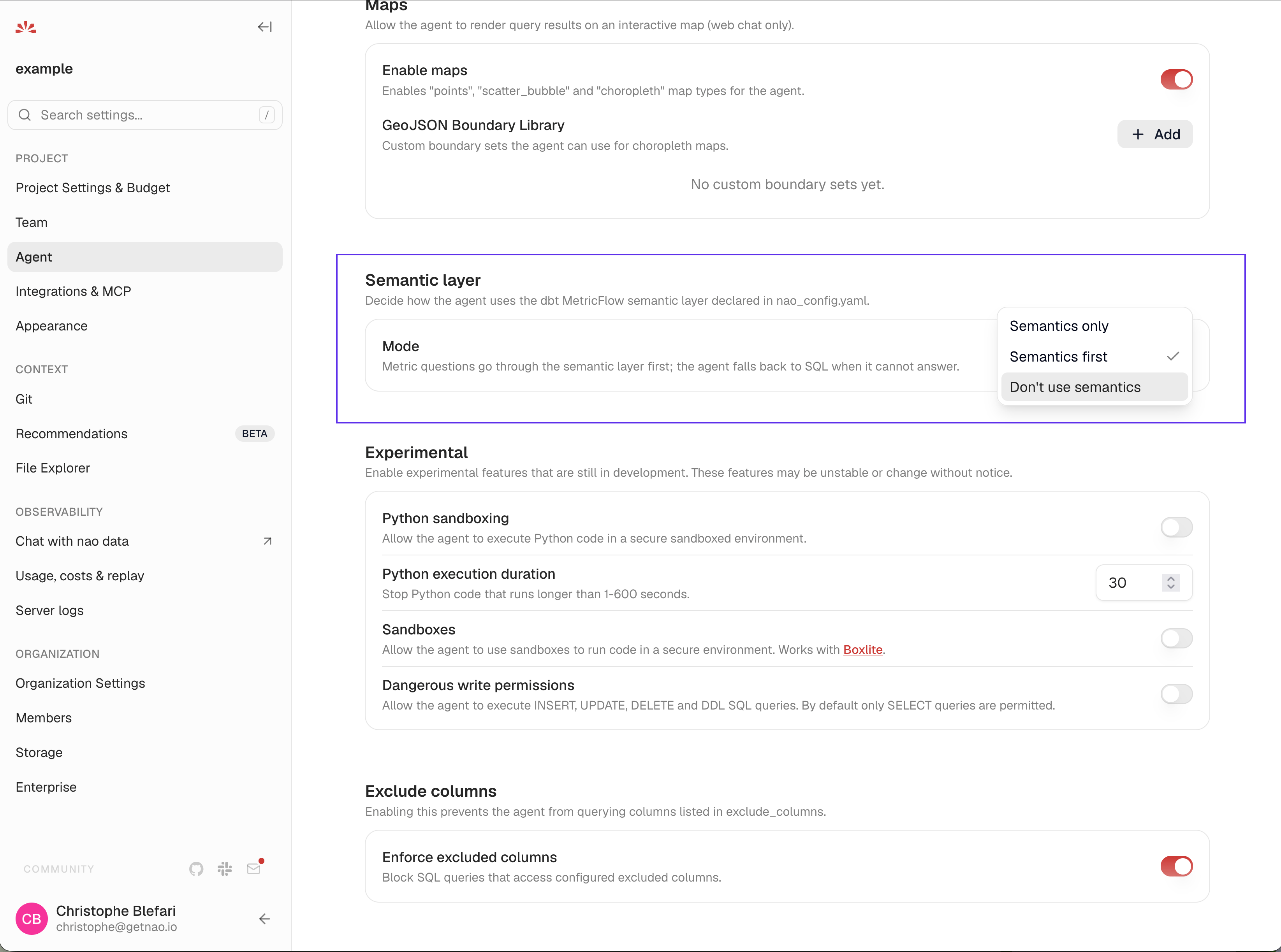 | Mode | `execute_semantic_query` | `execute_sql` on the warehouse | When to use it |
| ----------------------------- | ------------------------ | -------------------------------------- | ------------------------------------------------------------------------------------------------------------------------------------------------------------------ |
| **Semantics first** (default) | yes | yes, for what the layer does not cover | Most projects. Metric questions go through the layer; the agent falls back to SQL when no metric or dimension answers the question, and says so. |
| **Semantics only** | yes | no | Teams that want every warehouse number to come from a governed definition. Raw SQL is limited to nao's local DuckDB, to reshape earlier results and read files. |
| **Don't use semantics** | no | yes | The definitions stay readable as context in `semantics/`. The agent is told to reproduce a metric's definition faithfully in the SQL it writes, and to say it did. |
The mode changes both the tool set and the system prompt: in **Semantics only**, the warehouse databases are not even listed as SQL targets, and the agent is told that metrics are the only way in.
**Semantics only** is as complete as your semantic layer. Questions about
tables outside the semantic models cannot be answered in this mode; the agent
is instructed to say so and offer what the layer can answer instead. Start
with **Semantics first**, look at where the agent still falls back to SQL, and
tighten once the layer covers what people actually ask.
## Working with it
* **Context engineering still applies.** `RULES.md` is the place to say which metric to prefer when several overlap, and what "customer" means for your business. See the [add-semantic-layer skill](https://github.com/getnao/nao/tree/main/skills/add-semantic-layer) for a guided setup.
* **Test it.** Metric questions make excellent [evaluation](/nao-agent/context-engineering/evaluation) cases, because the expected answer is unambiguous by definition.
* **When a query fails to compile**, MetricFlow's error (unknown metric, unresolved dimension, bare column in a filter) is returned to the agent, which corrects the call. If a metric you know exists is reported as unknown, the manifest is stale: run `dbt parse` and `nao sync -p semantics` again.
* **Snowflake semantic views** are a different mechanism, imported as context by the [databases provider](/nao-agent/context-builder/databases#snowflake-semantic-views). They are documentation for the agent; MetricFlow is an executable layer.
## What it looks like
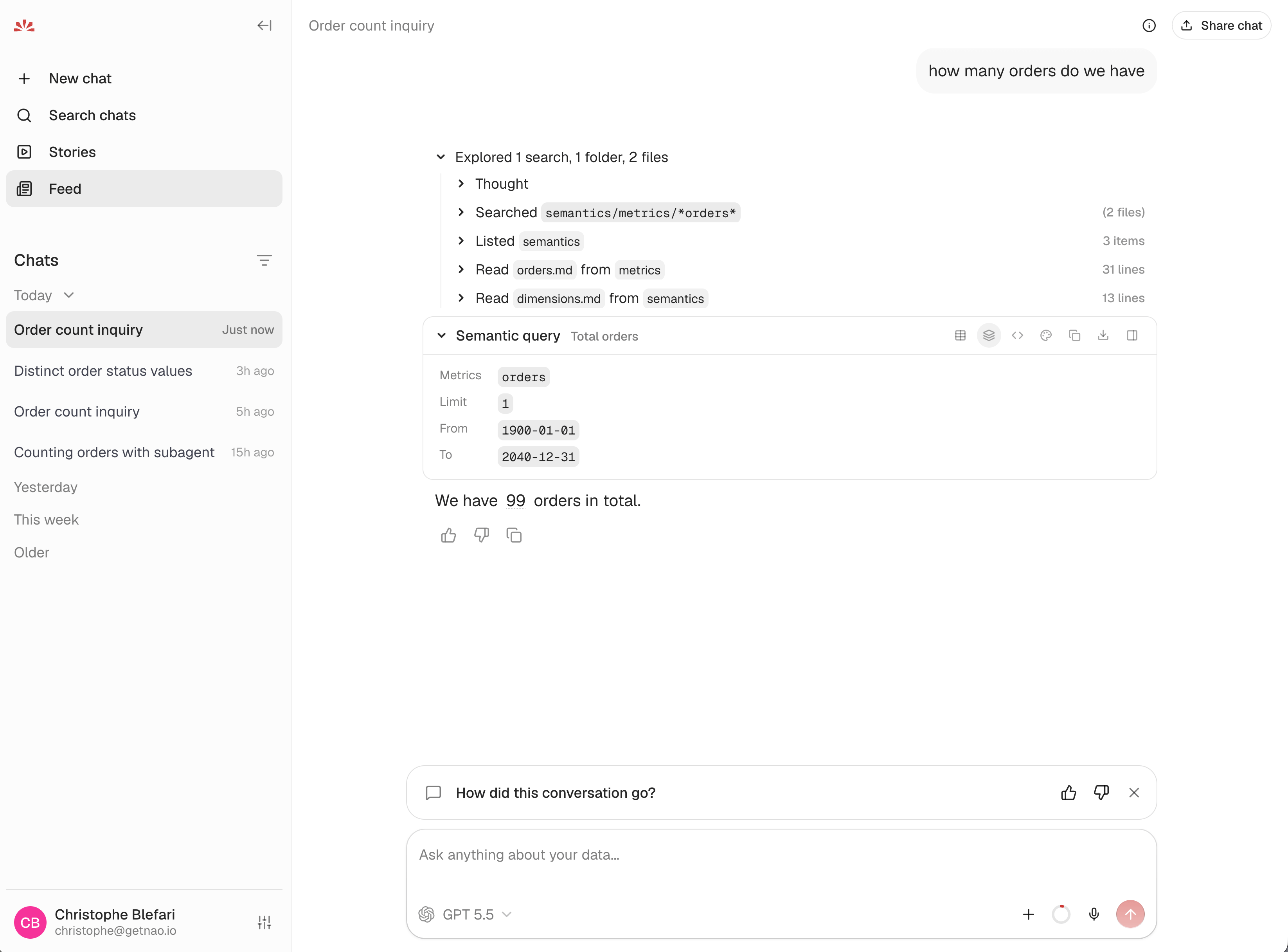
A user asks "how many orders do we have". Before touching the tool, the agent does what the system prompt tells it to: it searches `semantics/metrics/` for a matching metric, reads `orders.md` and `dimensions.md`, and only then calls `execute_semantic_query`. The **Semantic query** block in the chat shows the request as it was sent - here the `orders` metric alone, with the default time bounds - and the icons on its right switch between the results, this definition and the compiled SQL.
| Mode | `execute_semantic_query` | `execute_sql` on the warehouse | When to use it |
| ----------------------------- | ------------------------ | -------------------------------------- | ------------------------------------------------------------------------------------------------------------------------------------------------------------------ |
| **Semantics first** (default) | yes | yes, for what the layer does not cover | Most projects. Metric questions go through the layer; the agent falls back to SQL when no metric or dimension answers the question, and says so. |
| **Semantics only** | yes | no | Teams that want every warehouse number to come from a governed definition. Raw SQL is limited to nao's local DuckDB, to reshape earlier results and read files. |
| **Don't use semantics** | no | yes | The definitions stay readable as context in `semantics/`. The agent is told to reproduce a metric's definition faithfully in the SQL it writes, and to say it did. |
The mode changes both the tool set and the system prompt: in **Semantics only**, the warehouse databases are not even listed as SQL targets, and the agent is told that metrics are the only way in.
**Semantics only** is as complete as your semantic layer. Questions about
tables outside the semantic models cannot be answered in this mode; the agent
is instructed to say so and offer what the layer can answer instead. Start
with **Semantics first**, look at where the agent still falls back to SQL, and
tighten once the layer covers what people actually ask.
## Working with it
* **Context engineering still applies.** `RULES.md` is the place to say which metric to prefer when several overlap, and what "customer" means for your business. See the [add-semantic-layer skill](https://github.com/getnao/nao/tree/main/skills/add-semantic-layer) for a guided setup.
* **Test it.** Metric questions make excellent [evaluation](/nao-agent/context-engineering/evaluation) cases, because the expected answer is unambiguous by definition.
* **When a query fails to compile**, MetricFlow's error (unknown metric, unresolved dimension, bare column in a filter) is returned to the agent, which corrects the call. If a metric you know exists is reported as unknown, the manifest is stale: run `dbt parse` and `nao sync -p semantics` again.
* **Snowflake semantic views** are a different mechanism, imported as context by the [databases provider](/nao-agent/context-builder/databases#snowflake-semantic-views). They are documentation for the agent; MetricFlow is an executable layer.
## What it looks like
A user asks "how many orders do we have". Before touching the tool, the agent does what the system prompt tells it to: it searches `semantics/metrics/` for a matching metric, reads `orders.md` and `dimensions.md`, and only then calls `execute_semantic_query`. The **Semantic query** block in the chat shows the request as it was sent - here the `orders` metric alone, with the default time bounds - and the icons on its right switch between the results, this definition and the compiled SQL.
 The follow-up, "show the split per status and the % of share", shows the two tools working together. The agent runs a second semantic query, `orders` grouped by `order__status`, so the count per status still comes from the governed definition. The share of total is not a metric, so it is not the layer's job: the agent reshapes the semantic result with a short SQL query in nao's local DuckDB, reading the previous result by its query id (`FROM query_35c52ea2`). The governed number is never recomputed by hand; the arithmetic on top of it is.
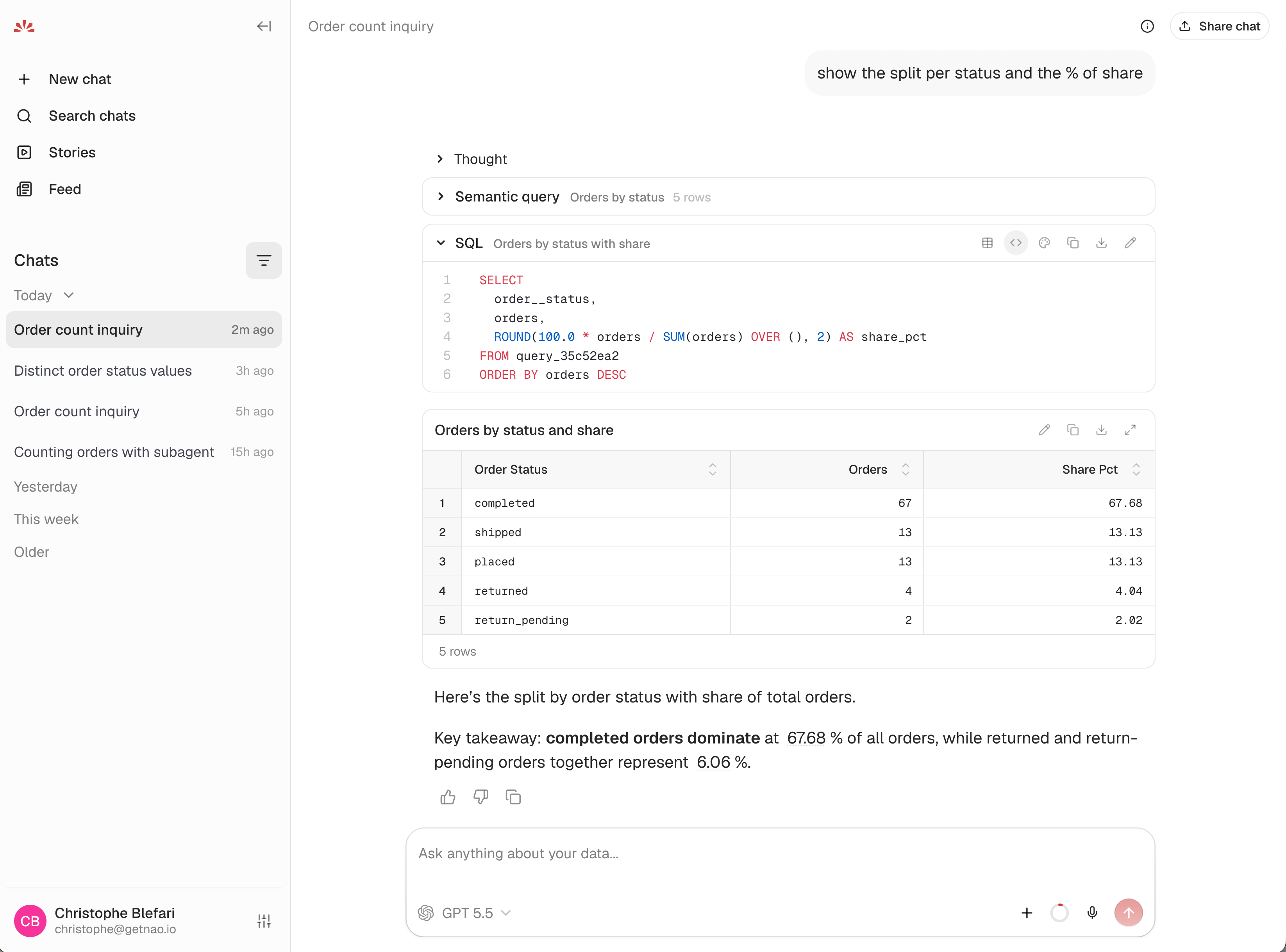 This is the pattern to expect in **Semantics first** and **Semantics only** alike: metrics come from the layer, and SQL is for what comes after them.
Sync the dbt project itself so the agent can read the models behind the
metrics
Turn metric questions into test cases with unambiguous expected answers
This is the pattern to expect in **Semantics first** and **Semantics only** alike: metrics come from the layer, and SQL is for what comes after them.
Sync the dbt project itself so the agent can read the models behind the
metrics
Turn metric questions into test cases with unambiguous expected answers